|
|
||
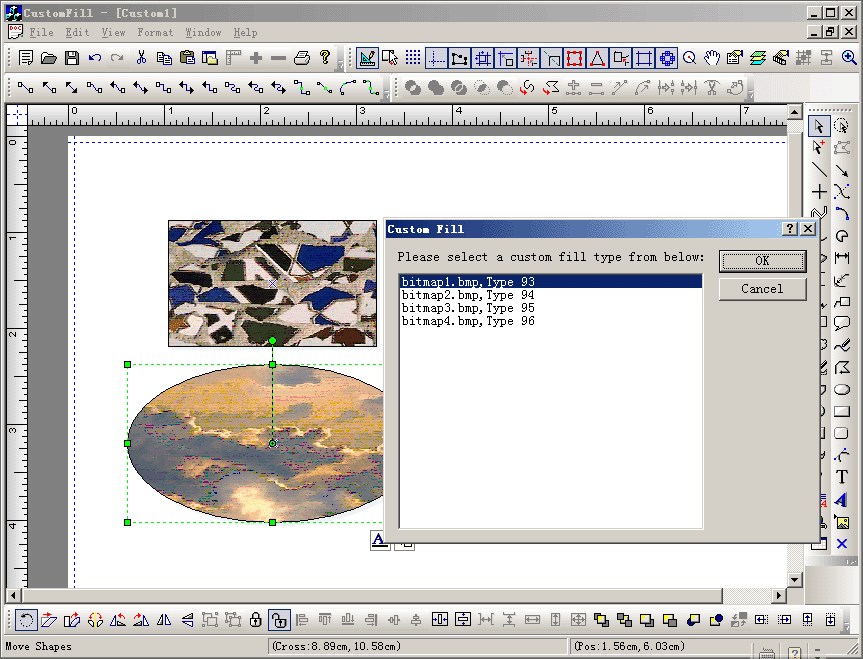
Steps: 1. Create a new dialog to setting the new fill type, see class CCustomFillDlg. 2. Add a new method to CCustomFillView for setting the fill type, as below: void CCustomFillView::OnCustomFill() { // TODO: Add your command handler code here if(m_listSelectComp.GetCount()>=1) { CFODrawShape *pShape = (CFODrawShape *)GetCorrectSelectPropShape(); CCustomFillDlg dlg; dlg.nCursorType = dlg.m_nBrushType = pShape->GetBrushType(); if(dlg.DoModal() == IDOK) { if(dlg.bModify && dlg.nCursorType >= 0) { CFOMultiShapePropAction* pAction = GetCurrentModel()->GetShapesPropAction(); if(dlg.nCursorType != dlg.m_nBrushType) pAction->AddShapesInt(m_listSelectComp,dlg.nCursorType,P_ID_BURSHTYPE); GetCurrentModel()->Do(pAction, TRUE); GetCurrentModel()->SetModifiedFlag(); } } } } 3. Create a new class CNewVisualProxy that use CFOPVisualProxy as base class. 4. Override the following method of CFOPVisualProxy: // Fill with custom type. // pDC -- pointer of the DC. // rect -- position to fill. // bTitle -- title or not. // nType -- fill type. // pRgn -- clip rgn. virtual void FillCustomWithType(CDC *pDC, CRect rect,BOOL bTitle, UINT nType,CRgn *pRgn = NULL); void CNewVisualProxy::FillCustomWithType(CDC *pDC, CRect rect,BOOL bTitle, UINT nType,CRgn *pRgn) { bTitle; int nSaveDC1 = 0; if(!pDC->IsPrinting()) { pDC->LPtoDP(&rect); nSaveDC1 = pDC->SaveDC(); pDC->SetMapMode(MM_TEXT); pDC->SetWindowOrg(0,0); pDC->SetViewportOrg(0,0); } if(pRgn != NULL) { pDC->SelectClipRgn(pRgn); } if(nType >=0) { CString strFile; switch(nType) { case 1: { strFile = "\\image\\bitmap1.bmp"; } break; case 2: { strFile = "\\image\\bitmap2.bmp"; } break; case 3: { strFile = "\\image\\bitmap3.bmp"; } break; case 4: { strFile = "\\image\\bitmap4.bmp"; } break; } CString strPathX = AfxGetApp()->m_pszHelpFilePath; strPathX = strPathX.Left(strPathX.ReverseFind('\\')); CString strOtherFile; strOtherFile = strPathX+strFile; CFOBitmap aBitmap; aBitmap.Read(strOtherFile); CRect rcPos = rect; aBitmap.Stretch(pDC, rcPos.left, rcPos.top, rcPos.Width(), rcPos.Height(), 0,0, // top of source aBitmap.GetWidth(), // height of source aBitmap.GetHeight(), // width of source SRCCOPY); } if(pRgn != NULL) { pDC->SelectClipRgn( NULL ); } if(!pDC->IsPrinting()) { pDC->RestoreDC(nSaveDC1); } } 5. Add new custom context menu: CMenu* CCustomFillView::CreateContextMenu() { // load the menu resource if (m_pContextMenu) { delete m_pContextMenu; } CMenu* pMenu; m_pContextMenu = new CMenu(); m_pContextMenu->LoadMenu(IDR_NEW_MENU); if(m_listSelectComp.GetCount() == 1) { pMenu = m_pContextMenu->GetSubMenu(0); AddOleToMenu(pMenu->m_hMenu); } else { pMenu = m_pContextMenu->GetSubMenu(0); } ASSERT_VALID(pMenu); return pMenu; } 6. Create new quick click icon: void CCustomFillView::DoGenInitItems(CFODrawShape *pObjTemp) { CFODrawView::DoGenInitItems(pObjTemp); } void CCustomFillView::DoWhenClickAddi() { if(m_nCurHitAddiType == 1001) { OnCustomFill(); } else { CFODrawView::DoWhenClickAddi(); } } |
Copyright ?1998-2007 UCanCode.Net Software, all rights reserved.
Other product and company names herein may be the trademarks of their respective owners.
Please direct your questions or comments to webmaster@ucancode.com