|
What is E-XD++
Diagrammer?
Easily add a
wide variety of customizable diagrams to your VB,
.NET, and VC++ applications. UCanCode E-XD++
Diagrammer is an extensible and high-performance VC++
diagramming framework for Windows applications. It can be
used for programmatically creating flowchart, workflow, network,
swimlane, maps, org chart, process flow, state transitions and
other such diagrams or for developing Microsoft Visio-like
interactive graphics and diagramming applications. It stores
graphical objects in a node graph and renders those objects onto
the screen. UCanCode E-XD++ Diagrammer supports both vector and
raster graphics on the drawing surface.
Configure and integrate sophisticated C++ diagram and dashboard
displays quickly and easily. UCanCode E-XD++ Diagrammer
gives you fine-grained control over every aspect of the user
interface with very little coding.
UCanCode
E-XD++ Diagrammer is the most comprehensive set of VC++
tools, components and libraries for creating graphical
editing, visualization, supervision and monitoring tools. Both
diagrams–displays used to show the relationships between
objects–and dashboards–displays for monitoring business or
industrial systems–can be easily created.
Point-and-click editors and a full
software development C++ Source Code kit (SDK)
UCanCode
E-XD++ Diagrammer offers a powerful set of tool to help
developers quickly and efficiently create diagrams and process
flow. It provides a very professional diagram editor to
automate application production without coding. This diagram
editor tools address the different aspects of producing
appropriate content-based diagram and flowchart displays. It has
the following features:
1.
Opening or saving file with xdg file format, these xdg files can
be imported by your E-XD++ Application with files or resources.
2.
Import any kind of SVG XML files.
3.
Unlimited zooming and Undo / Redo
4.
Large canvas supports.
5.
Define over 5 unique IDS for any shape on the canvas. With these
IDS, you can make any identfication between any shapes on your
diagram.
6.
Full control the toolbox window with the same like MS Visio.
7.
Sharing the toolbox trs files with ShapeDesigner of E-XD++
Library.
8.
Place image map file on the canvas, and place hylinks on the
image (Supports rectangle hylink, ellipse hylink, and polygon
links).
9. New
extend event setting dialog, with this dialog, you can set any
kind of event for each shape on the canvas.
10.
Tons of other features...
All the
vc++ source codes of this
diagram editor will be shipped with full edition of E-XD++
Enterprise Edition Suite:
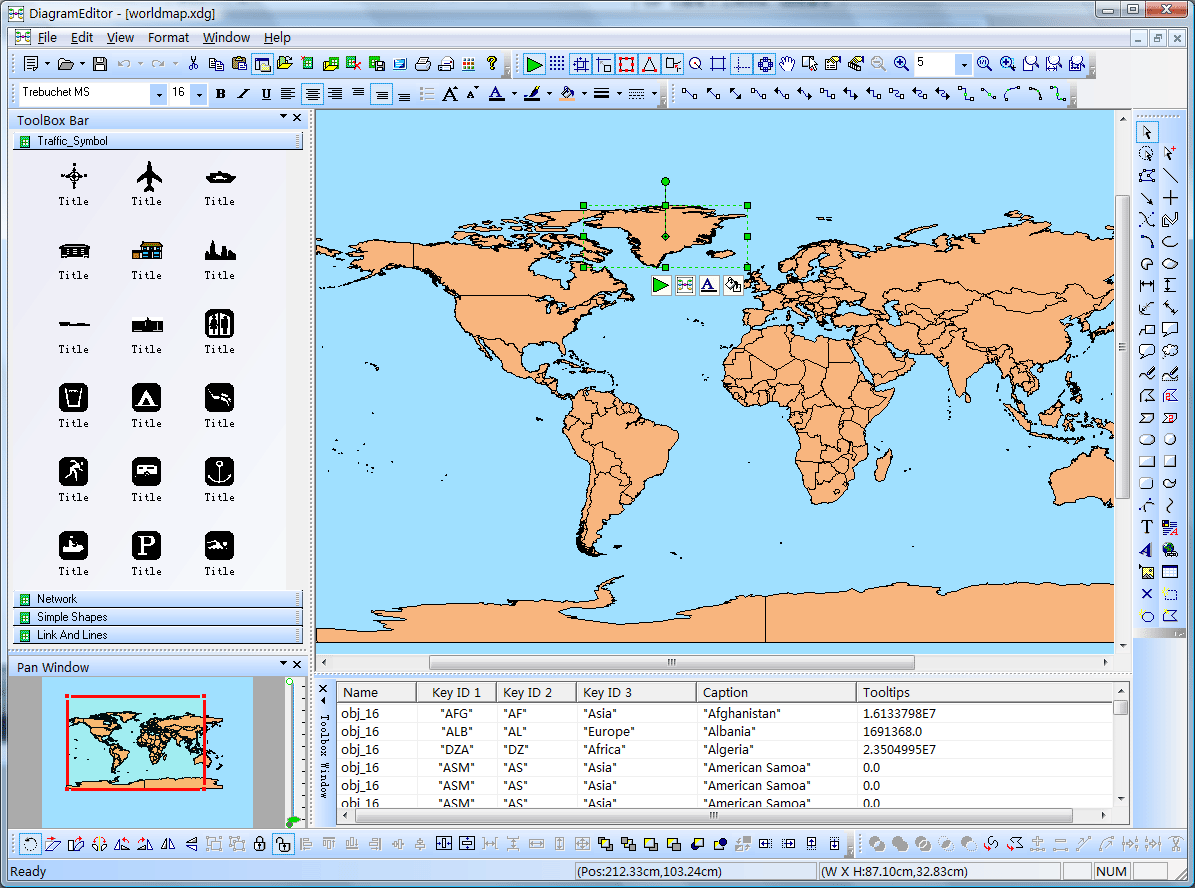
Here is a screen shot of the diagram editor:
UCanCode E-XD++ is also
the best source code component for adding any kind of
network visualization feature to your own application, it was
designed specifically to help you
create diagrams for
human resources management, network diagram, dashboard, and
management structures. It will help you visualize and structure
information, add illustrations and drawings to your
documents and make all this fast and easy, currently, it
supports horizontal and vertical tree layout, layer layout...,
it is full written with VC++ Source Codes.
|

