|
|
||
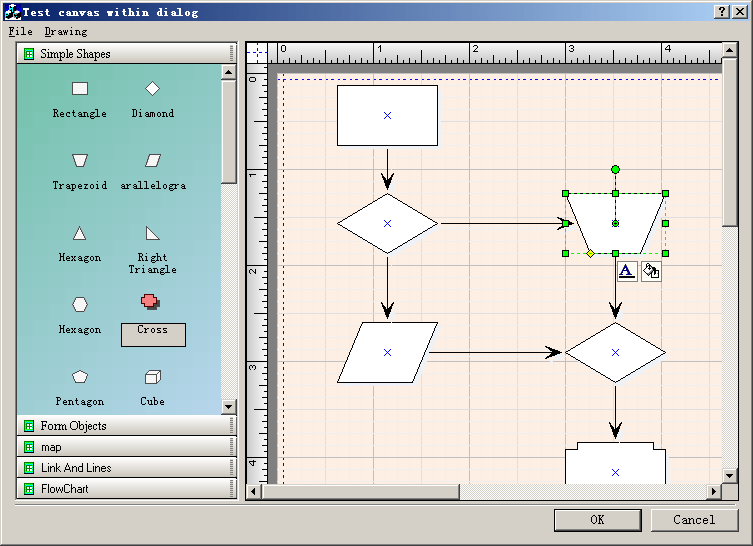
Steps: 1.Create a new class CExtDataModel that use CFODataModel as base class. 2. Add the following codes within the header file of dialog: CFOPDrawWnd m_wndCanvas; CExtDataModel * m_pDataModel; // Toolbox wnd. CFOMultiToolBoxWnd m_wndTool; // Attributes CFOListItemObjList m_Shapes; // Load resource file. virtual void LoadFromFile(); // Find item with id. // nIndex -- the id of item. virtual CFOListItemObj *FindObjByID(int nIndex); // Do create toolbox pages. virtual void DoCreatePages(); virtual BOOL ContinueModal(); 3. Add the following codes to create the canvas and toolbox window: // TODO: Add extra initialization here m_pDataModel = new CExtDataModel; CRect theRect; GetDlgItem(IDC_CANVAS)->GetWindowRect( &theRect ); ScreenToClient(&theRect); // m_wndClock.Create(WS_CHILD|WS_VISIBLE|WS_BORDER,theRect, this,1001); DWORD dwStyle = WS_CHILD|WS_VISIBLE|WS_BORDER|WS_TABSTOP; m_wndCanvas.SetCurrentModel(m_pDataModel); m_wndCanvas.Create(dwStyle, theRect,this,IDC_CANVAS); CRect rcClient; m_wndCanvas.GetClientRect(&rcClient); m_wndCanvas.SetVirtualOrigin(0, 0); m_wndCanvas.SetVirtualSize(1000, 1000); m_wndTool.Create(WS_CHILD|WS_VISIBLE|WS_TABSTOP|WS_EX_CLIENTEDGE,CRect(0,0,100,100),this,IDC_TOOLBOX); // Do create toolbox pages. DoCreatePages(); GetDlgItem(IDC_TOOLBOX)->GetWindowRect( &theRect ); ScreenToClient(&theRect); m_wndTool.SetWindowPos( NULL, theRect.left, theRect.top, theRect.Width(), theRect.Height(), SWP_NOZORDER|SWP_NOACTIVATE ); 4. Call actions like the following codes: void CDialogTestDlg::OnDrawEllipse() { // TODO: Add your command handler code here m_wndCanvas.OnFOPFoDrawEllipse(); } void CDialogTestDlg::OnUpdateDrawEllipse(CCmdUI* pCmdUI) { // TODO: Add your command update UI handler code here m_wndCanvas.OnFOPUpdateFoDrawEllipse(pCmdUI); } void CDialogTestDlg::OnFileOpen() { // TODO: Add your command handler code here static CString szFilter = _T("Test Dialog file(*.tdf)|*.tdf|"); CFileDialog fileDlg(TRUE, _T(".tdf"), "", OFN_HIDEREADONLY | OFN_OVERWRITEPROMPT,szFilter, NULL); if (fileDlg.DoModal() != IDOK) return; CString m_lstfilename = fileDlg.GetPathName(); m_wndCanvas.OpenDocument(m_lstfilename); } void CDialogTestDlg::OnUpdateFileOpen(CCmdUI* pCmdUI) { // TODO: Add your command update UI handler code here pCmdUI; } void CDialogTestDlg::OnFileSave() { // TODO: Add your command handler code here static CString szFilter = _T("Test Dialog file(*.tdf)|*.tdf|"); CFileDialog fileDlg(FALSE, _T(".tdf"), "Test.tdf", OFN_HIDEREADONLY | OFN_OVERWRITEPROMPT,szFilter, NULL); if (fileDlg.DoModal() != IDOK) return; CString m_lstfilename = fileDlg.GetPathName(); m_wndCanvas.SaveDocument(m_lstfilename); } void CDialogTestDlg::OnPageSetup() { // TODO: Add your command handler code here if(m_wndCanvas.OnFOPPageSetup()) { m_wndCanvas.DoUpdateScrollBars(); } } void CDialogTestDlg::OnUpdatePageSetup(CCmdUI* pCmdUI) { // TODO: Add your command update UI handler code here pCmdUI; } BOOL CDialogTestDlg::ContinueModal() { if (m_wndCanvas.m_bPrintPreview) // send WM_IDLEUPDATECMDUI message to update toolbar state // This is normally called by OnIdle function in SDI or MSI applications. // Dialog based applications don't call OnIdle, so send the message from here instead AfxGetApp()->m_pMainWnd->SendMessageToDescendants(WM_IDLEUPDATECMDUI, (WPARAM)TRUE, 0, TRUE, TRUE); return CDialog::ContinueModal(); } void CDialogTestDlg::OnFilePrint() { // TODO: Add your command handler code here m_wndCanvas.DoPrint(); } BOOL CAboutDlg::OnInitDialog() { CDialog::OnInitDialog(); // TODO: Add extra initialization here GetDlgItem(IDC_EDIT1)->SetWindowText(_T("If you want to learn more about E-XD++ Diagrammer Library Enterprise Edition,Visit:http://www.ucancode.net")); return TRUE; // return TRUE unless you set the focus to a control // EXCEPTION: OCX Property Pages should return FALSE } void CDialogTestDlg::OnFilePrintPreview() { // TODO: Add your command handler code here m_wndCanvas.PrintPreview(); } |
Copyright ?1998-2007 UCanCode.Net Software, all rights reserved.
Other product and company names herein may be the trademarks of their respective owners.
Please direct your questions or comments to webmaster@ucancode.com