|
UCanCode Software
Inc. is a leading provider of Dynamic Graphics, Data
Visualization, Human-Machine Interface (HMI) and Real-Time
Mapping Solutions for software developers around the world. Its
products are used to visualize and control real-time
and mission-critical processes in a variety of industries, from
producing silicon wafers and controlling chemical plants to
launching satellites into space and monitoring airport security.
UCanCode provides a complete set
of services, consisting of design tools and a software
development kit (SDK), for developers who want to create
a user interface for industrial monitoring and process
control drawing real time data display applications.
These displays feature highly customized graphical objects that
connect to underlying real-world data.
Developers prefer ucancode's
solutions because they are easy to use, completely customizable,
and can deploy to both the desktop and the Web. ucancode is the
industry’s leading real-time SPC software, automating
quality data collection and analysis
Add Diagrams and real time
data display to your applications. E-XD++ Diagrammer brings
accurate and intuitive diagrams and dashboards to your c++
desktop applications. It offers a comprehensive set of tools,
components and graphic objects for creating visualization,
editing and monitoring Windows applications.
It is very quickly and easily to
use E-XD++ to build any real time data display Software:
1. Design the real time data
display symbols:
With E-XD++ full edition, there
is a shapedesigner application shipped, with this diagramming
tool, you can use many advance features to build any kind of
real time data display Software symbols, as below:

When one composite symbol is
designed, just use Copy/Paste to place it within the toolbox
window at left side. These real time data display Symbols
will be ready for use in future.
2. Design real time
data display Software Screen:
With E-XD++ full edition, there
is also a ready to use real time data display Screen
design tool shipped, with this tool, you can use any symbols
within the toolbox window at left side to build any screen as
you want, just drag and drop, very simple and easy:
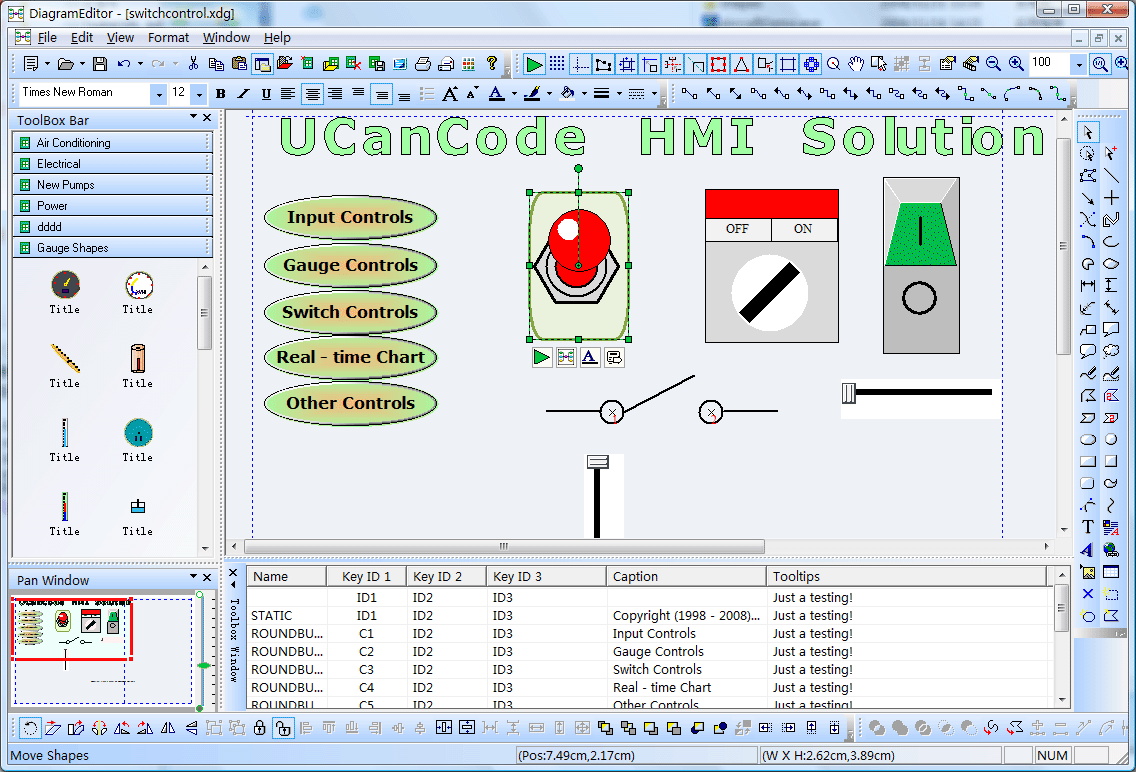
If you want to identify any
shape on the screen, just use the following dialog to define
some key value. There are three key values that can be used to
do this work, as below:

We change it's key value 1 to
K2.
After one real time data
display Software Screen is finished, you can save it to a
xdg file. You can design as many screen as you want.
3. Building your real time
data display Software:
With full edition of E-XD++
Visualization Component, there is an appwizard that will help
you building a base framework of real time data display
Software without written a line of codes, after the base
framework of your application is finished, you can import any
XDG files into your application, (Please remember the resource
type must be XDGRes), to load a real time data display
Screen just call the following codes, it is very easy:
LoadXdgFromResource(IDR_MAIN, _T("XdgRes"), FALSE);
In fact, this line of code can
be called at any place if you want to load any new screen at any
time.
4.
Update the screen with data:
Mostly we can use the WM_TIMER
of CWnd to recieve the data and refresh the real time data
display Screen, if you want to update only one shape, just
call UpdateControl of this shape, but if you want to update a
list of shapes one time, we recommend you to call UpdateShapes,
this will works more effective
If you want to handle the click
event, you can DoButtonClickEvent to do that.
That's all, below is the running
- time mode of this sample.
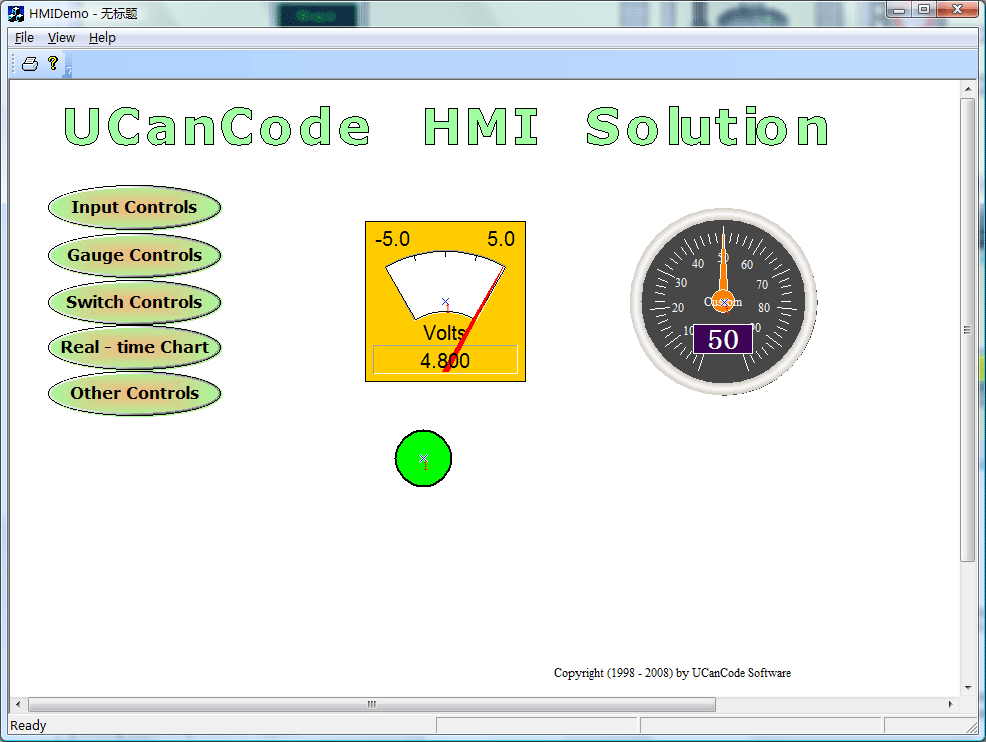
and
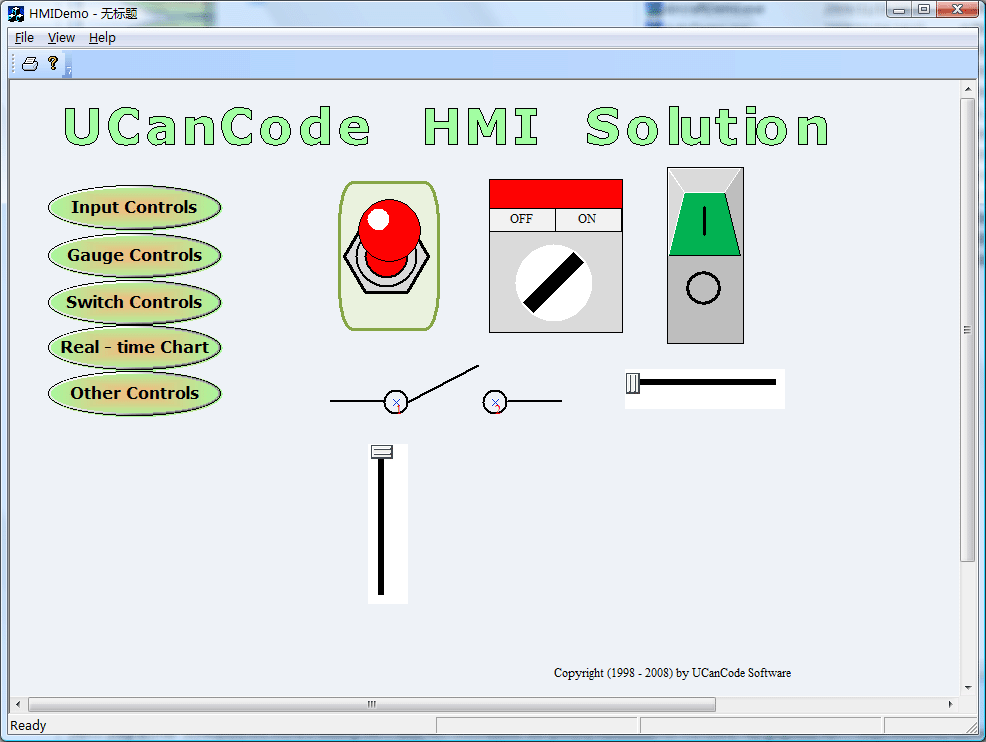
- real time data display
Software Component
- Process Control Diagram
- Full VC++ Source Code
- Real - time Drawing
- Very easy to use shape
Designer
- SVG Import
With E-XD++ Component,
you can add advanced real time data display functionality to
your applications. The E-XD++ Library is a 100% VC++ data
rendering and visualization system, built specifically
for Visual Studio .NET and designed to bring your User Interface
to the printed page. Now you only need a few days for building a
very powerful label print or report print application.
The leader in visualization component
-- FULL VC++ Source Code Shipped!
XD++ Diagrammer
Suite is the the world’s leading VC++ and .NET visualization
component. Renowned for incredibly rich graphics, XD++ helps
thousands developers build applications that offer unparalleled
functionality. Outstanding productivity lowers project risk and
reduces maintenance headaches. With 10 years of dedicated
research and development, UCanCode leads the market for
visualization technologies, providing outstanding customer
support.
1. Load HMI Screen to canvas:
void
CHMIDemoView::OnInitialUpdate()
{
SetCurrentModel(GetDocument()->m_pDataModel);
CFODrawView::OnInitialUpdate();
LoadXdgFromResource(IDR_MAIN,
_T("XdgRes"),
FALSE); GetCurrentModel()->SetDesignMode(FALSE);
}
2. Do click event:
void
CHMIDemoView::OnLButtonUp(UINT
nFlags, CPoint point)
{
// TODO: Add your message handler code here and/or call
default
CFODrawView::OnLButtonUp(nFlags,
point);
CPoint local = point;
FODPtoLP(&local);
CFODrawShape *pShape
= (CFODrawShape *)GetCurrentModel()->HitTest(local);
CString str;
if(pShape
!= NULL)
{
// Add your code below
m_pCurRunModelHitShape
= NULL;
m_pCurRunModelMoveInShape =
NULL;
// Override this method to handle your own click event.
CString str =
pShape->GetKeyId1();
if(str
== _T("C1"))
{
LoadXdgFromResource(IDR_INPUT_CONTROL,
_T("XdgRes"),
FALSE);
}
else if(str
== _T("C2"))
{
LoadXdgFromResource(IDR_GAUGE_CONTROL,
_T("XdgRes"),
FALSE);
}
else if (str
== _T("C3"))
{
LoadXdgFromResource(IDR_SWITCH_CONTROL,
_T("XdgRes"),
FALSE);
}
else if (str
== _T("C4"))
{
LoadXdgFromResource(IDR_REAL_CHART,
_T("XdgRes"),
FALSE);
}
else if (str
== _T("C5"))
{
LoadXdgFromResource(IDR_OTHER_CONTROL,
_T("XdgRes"),
FALSE);
}
m_pCurRunModelHitShape =
NULL;
m_pCurRunModelMoveInShape =
NULL;
GetCurrentModel()->SetDesignMode(FALSE);
}
} |

