|
|
||
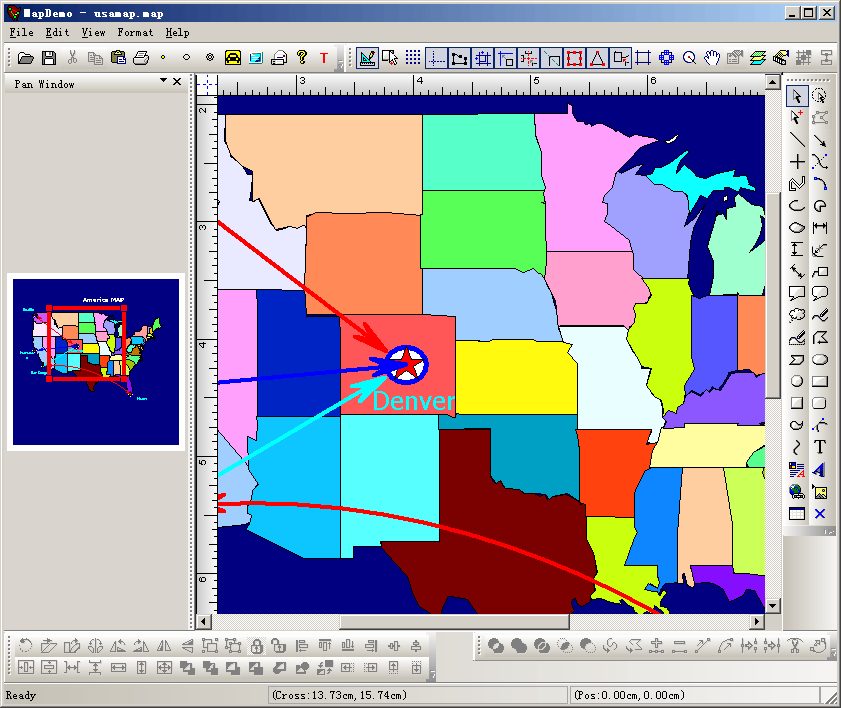
Steps: 1. Load sample diagram at running: // Parse command line for standard shell commands, DDE, file open CCommandLineInfo cmdInfo; ParseCommandLine(cmdInfo); // Dispatch commands specified on the command line if (cmdInfo.m_nShellCommand == CCommandLineInfo::FileNew) { CString strPathX = AfxGetApp()->m_pszHelpFilePath; strPathX = strPathX.Left(strPathX.ReverseFind('\\')); CString strOtherFile; strOtherFile = strPathX+_T("\\usamap.map"); this->OpenDocumentFile(strOtherFile); } else if (!ProcessShellCommand(cmdInfo)) { return FALSE; } 2. Showing pan window at left side: if (!m_wndPanBar.Create(this, _T("Pan Window"), WS_CHILD|WS_VISIBLE|CBRS_LEFT|CBRS_TOOLTIPS|CBRS_SIZE_DYNAMIC|CBRS_FLOAT_MULTI, CBRS_FOP_DEFAULT|CBRS_FOP_BDSP, 20002)) { TRACE(_T("Failed to create List Bar\n")); return -1; } DockControlBarEx(&m_wndPanBar, AFX_IDW_DOCKBAR_LEFT, 50, 200); LRESULT CMainFrame::OnViewValidMsg (WPARAM wparam, LPARAM lp) { lp; CFODrawView* pView = (CFODrawView*) wparam; m_wndPanBar.SetActiveView(pView); return 1; } LRESULT CMainFrame::OnViewInValidMsg (WPARAM wparam, LPARAM lp) { CFODrawView* ActiveView = (CFODrawView*) wparam; CFODrawView* DeactiveView = (CFODrawView*) lp; // VERY important change, handling the case when switch to othe app. if(ActiveView == DeactiveView) return 1; if (m_wndPanBar.GetActiveView()==DeactiveView) m_wndPanBar.SetActiveView(NULL); return 1; } LRESULT CMainFrame::OnShapeChangedMsg(WPARAM wP,LPARAM /*lP*/) { m_wndPanBar.UpdateWnd(FALSE); return TRUE; } LRESULT CMainFrame::OnCanvasChangedMsg(WPARAM wP,LPARAM lP) { int nLong = (int)lP; if(nLong == 100) { m_wndPanBar.UpdateWnd(TRUE); m_wndPanBar.RedrawWindow(); } else { m_wndPanBar.UpdateWnd(FALSE); } return TRUE; } 3. Draw composite shape on the canvas call: void CMapDemoView::OnFoMapItem1() { // TODO: Add your action handler code here if(m_drawshape == FO_COMP_COMPOSITE && m_nCurShapeResID == IDR_COMPSRES1) { m_action_state = State_SelectNone; m_drawshape = FO_COMP_NONE; FOSetSystemCursor(IDC_ARROW); return; } StartCustomShapeID(IDR_COMPSRES1); AddShapePort(0.5,0.5); } void CMapDemoView::OnUpdateFoMapItem1(CCmdUI* pCmdUI) { // TODO: Add your action update UI handler code here BOOL bDesign = GetCurrentModel()->IsDesignMode(); pCmdUI->Enable(bDesign); pCmdUI->SetCheck(m_drawshape == FO_COMP_COMPOSITE && m_nCurShapeResID == IDR_COMPSRES1); } void CMapDemoView::OnFoMapItem2() { // TODO: Add your action handler code here if(m_drawshape == FO_COMP_COMPOSITE && m_nCurShapeResID == IDR_COMPSRES2) { m_action_state = State_SelectNone; m_drawshape = FO_COMP_NONE; FOSetSystemCursor(IDC_ARROW); return; } StartCustomShapeID(IDR_COMPSRES2); AddShapePort(0.5,0.5); } void CMapDemoView::OnUpdateFoMapItem2(CCmdUI* pCmdUI) { // TODO: Add your action update UI handler code here BOOL bDesign = GetCurrentModel()->IsDesignMode(); pCmdUI->Enable(bDesign); pCmdUI->SetCheck(m_drawshape == FO_COMP_COMPOSITE && m_nCurShapeResID == IDR_COMPSRES2); } 4. Initial the view: void CMapDemoView::DoChangeModel(CFODataModel * pModel) { CSize szCanvas = CSize(1000,1000); pModel->SetCanvasSize(szCanvas); } void CMapDemoView::OnInitialUpdate() { SetCurrentModel(GetDocument()->m_pDataModel); CFODrawView::OnInitialUpdate(); GetCurrentModel()->SetBorderShow(FALSE); UpdateScrollBarSize(); ZoomToFitPageWidth(); } |
Copyright ?1998-2007 UCanCode.Net Software, all rights reserved.
Other product and company names herein may be the trademarks of their respective owners.
Please direct your questions or comments to webmaster@ucancode.com