|
|
||
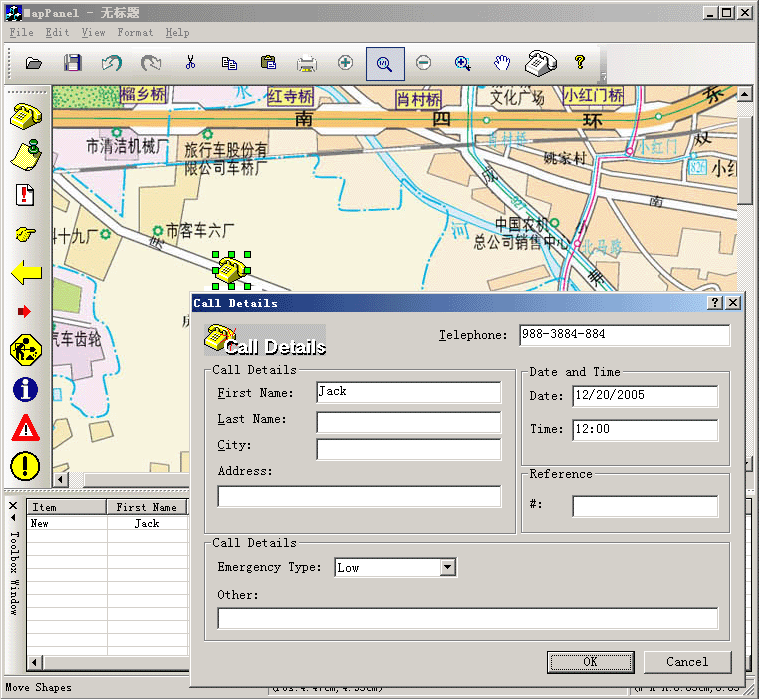
Steps: 1. Create map panel node: CFODrawShape *CExtDataModel::DoCreateShapeByType(UINT m_drawshape, CRect &rcCreate, CString strFileName, CFOToolBoxItem *pCurItem) { CFODrawShape *pReturn = NULL; CString strCaption; CString strName; strCaption = ""; strName = ""; CPoint ptTrack = rcCreate.TopLeft(); if(m_drawshape != FO_COMP_NONE) { CRect rc(rcCreate); rc.NormalizeRect(); if(rc.IsRectEmpty()||(rc.Width()<=10 && rc.Height()<20)) { switch(m_drawshape) { case MY_ICON_SHAPE: { rc = CRect(ptTrack.x-35,ptTrack.y-20,ptTrack.x+35,ptTrack.y+20); } break; default: { } break; } } switch(m_drawshape) { case MY_ICON_SHAPE: { pReturn = new CMyNewIconShape; pReturn->AddRef(); int nBitmap = GetBitmapID(); ((CMyNewIconShape *)pReturn)->Create(nBitmap,rc,""); ((CMyNewIconShape *)pReturn)->RemoveAllPorts(); // ((CMyNewIconShape *)pReturn)->SetResizeProtect(TRUE); strCaption = GetUniqueCaption(pReturn->GetType()); strName = GetUniqueName(pReturn->GetType()); pReturn->SetObjectCaption(strCaption); pReturn->SetObjectName(strName); } break; default: { pReturn = CFODataModel::DoCreateShapeByType(m_drawshape,rcCreate,strFileName); } break; } } return pReturn; }
void CMapPanelView::DoChangeModel(CFODataModel * pModel)
{
	CFODrawView::DoChangeModel(pModel);
	// Adding your data model init codes here..
	CSize szCanvas = CSize(2145,1460);

	TCHAR sPath[_MAX_PATH];
	TCHAR sDrive[_MAX_DRIVE];
	TCHAR sDir[_MAX_DIR];
	GetModuleFileName(NULL, sPath, _MAX_PATH);
	_tsplitpath(sPath, sDrive, sDir, NULL, NULL);
	_tmakepath(sPath, sDrive, sDir, _T("bj15"), _T("JPG"));

	CRect rc = CRect(0,0,2145,1460);

    CFOImageShape *pReturn = new CFOImageShape;
	pReturn->AddRef();
	pReturn->Create(rc,"Image");

	CString ext = _T("jpeg");

	FO_IMAGETYPE type = CFODrawHelper::FindType(ext);
	pReturn->LoadImage(sPath,type);

	pReturn->SetBkColor(RGB(233,233,255));
	GetCurrentModel()->GetBackDrawComp()->AddShape(pReturn);
	pReturn->SetResizeProtect(TRUE);
	pReturn->SetRotateProtect(TRUE);
	pReturn->Release();

	pModel->SetCanvasSize(szCanvas);
	GetCurrentModel()->SetBorderShow(FALSE);
	GetCurrentModel()->ShowMargin(FALSE);
//	GetCurrentModel()->SetPageBkColor(RGB(255,255,255));
	pModel->SetPageBkColor(RGB(255,255,255));
}

void CMapPanelView::OnInitialUpdate()
{
	SetCurrentModel(GetDocument()->m_pDataModel);
	CFODrawView::OnInitialUpdate();
	ShowRulers(FALSE);
	GetCurrentModel()->ShowGrid(FALSE);
	GetCurrentModel()->SetBorderShow(FALSE);
	GetCurrentModel()->ShowMargin(FALSE);
	UpdateScrollBarSize();
}

3. Create a new class CMyNewIconShape that uses CFOIconShape as base class.
4. Drawing tool:
void CMapPanelView::OnMyDrawTool1() { // TODO: Add your command handler code here CExtDataModel *pModel = (CExtDataModel *)GetCurrentModel(); m_drawshape = MY_ICON_SHAPE; SetCurrentDrawingCursor(IDC_FO_DRAWSHAPE_CURSOR); m_action_state = State_OnlyDrop; m_bUpRightMode = FALSE; pModel->SetImageType(1); } void CMapPanelView::OnUpdateMyDrawTool1(CCmdUI* pCmdUI) { // TODO: Add your command update UI handler code here CExtDataModel *pModel = (CExtDataModel *)GetCurrentModel(); BOOL bDesign = GetCurrentModel()->IsDesignMode(); pCmdUI->Enable(bDesign); pCmdUI->SetCheck(m_drawshape == MY_ICON_SHAPE && (!m_bUpRightMode) && (pModel->GetImageType() == 1)); } 5. Custom the context menu: CMenu* CMapPanelView::CreateContextMenu() { return CFODrawView::CreateContextMenu(); // load the menu resource if (m_pContextMenu) { delete m_pContextMenu; } CMenu* pMenu; m_pContextMenu = new CMenu(); m_pContextMenu->LoadMenu(IDR_MENU_POPUP); if(m_listSelectComp.GetCount() == 1) { pMenu = m_pContextMenu->GetSubMenu(0); AddOleToMenu(pMenu->m_hMenu); } else { pMenu = m_pContextMenu->GetSubMenu(0); } ASSERT_VALID(pMenu); return pMenu; } 6. Change custom property values: void CMapPanelView::OnShapeCustom() { // TODO: Add your command handler code here CFODrawShapeList lstUpdate; CFODrawShapeList m_ListTemp; int nCount = 0; BOOL bFirst = TRUE; CFODrawShape *pShape = NULL; CMyNewIconShape *pFirst = NULL; POSITION pos = m_listSelectComp.GetHeadPosition(); while(pos != NULL) { pShape = (CFODrawShape *)m_listSelectComp.GetNext(pos); if(HAS_BASE(pShape,CMyNewIconShape)) { if(bFirst) { pFirst = static_cast<CMyNewIconShape *>(pShape); bFirst = FALSE; } m_ListTemp.AddTail(pShape); nCount ++; } lstUpdate.AddTail(pShape); } if(nCount > 0) { CMyPropDlg dlg; CExtProp *pProp = pFirst->GetMyProperty(); dlg.m_nOldType = dlg.m_nType = pProp->m_nEmeryType; dlg.m_strOldCity = dlg.m_strCity = pProp->m_strCity; dlg.m_OldDate = dlg.m_Date = pProp->m_strDate; dlg.m_strOldFirstName = dlg.m_strFirstName = pProp->m_strFirstName; dlg.m_strOldLastName = dlg.m_strLastName = pProp->m_strLastName; dlg.m_strOldOther = dlg.m_strOther = pProp->m_strOther; dlg.m_strOldPhone = dlg.m_strPhone = pProp->m_strNo; dlg.m_strOldRef = dlg.m_strRef = pProp->m_strReference; dlg.m_strOldStreet = dlg.m_strStreet = pProp->m_strStreet; dlg.m_strOldTime = dlg.m_strTime = pProp->m_strTime; if(dlg.DoModal() == IDOK) { if(dlg.m_nOldType != dlg.m_nType || dlg.m_strOldCity != dlg.m_strCity || dlg.m_OldDate != dlg.m_Date || dlg.m_strOldFirstName != dlg.m_strFirstName || dlg.m_strOldLastName != dlg.m_strLastName || dlg.m_strOldOther != dlg.m_strOther || dlg.m_strOldPhone != dlg.m_strPhone || dlg.m_strOldRef != dlg.m_strRef || dlg.m_strOldStreet != dlg.m_strStreet || dlg.m_strOldTime != dlg.m_strTime) { CFOMultiShapePropAction* pAction = GetCurrentModel()->GetShapesPropAction(); pAction->AddShapesInt(m_ListTemp,dlg.m_nType,ID_PROP_EMERYTYPE); pAction->AddShapesString(m_ListTemp,dlg.m_strFirstName,ID_PROP_FIRSTNAME); pAction->AddShapesString(m_ListTemp,dlg.m_strLastName,ID_PROP_LASTNAME); pAction->AddShapesString(m_ListTemp,dlg.m_strStreet,ID_PROP_STREET); pAction->AddShapesString(m_ListTemp,dlg.m_strPhone,ID_PROP_NO); pAction->AddShapesString(m_ListTemp,dlg.m_strCity,ID_PROP_CITY); pAction->AddShapesString(m_ListTemp,dlg.m_Date,ID_PROP_DATE); pAction->AddShapesString(m_ListTemp,dlg.m_strTime,ID_PROP_TIME); pAction->AddShapesString(m_ListTemp,dlg.m_strRef,ID_PROP_REFERENCE); pAction->AddShapesString(m_ListTemp,dlg.m_strOther,ID_PROP_OTHER); GetCurrentModel()->Do(pAction, TRUE); GetCurrentModel()->SetModifiedFlag(); } } } if(lstUpdate.GetCount()>0) { UpdateShapes(&lstUpdate); } }
|
Copyright ?1998-2007 UCanCode.Net Software, all rights reserved.
Other product and company names herein may be the trademarks of their respective owners.
Please direct your questions or comments to webmaster@ucancode.com