|
|
||
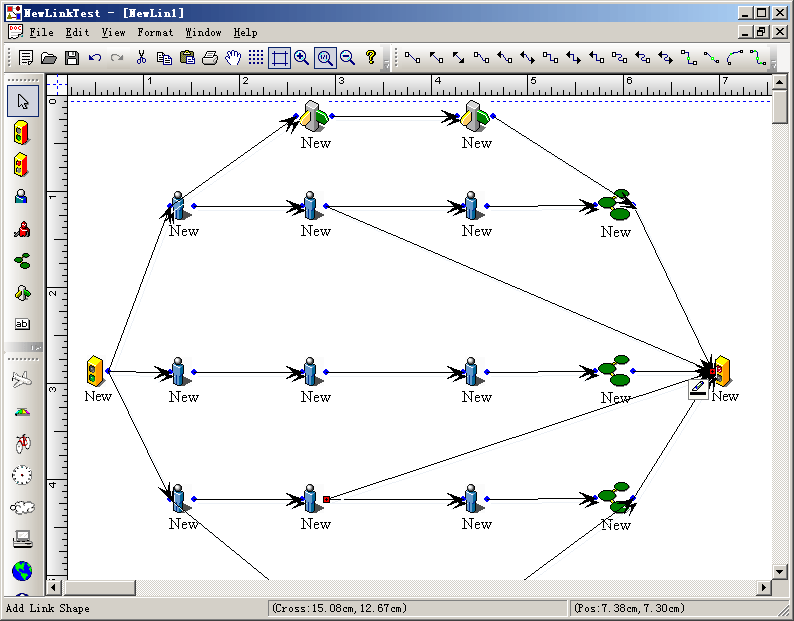
Steps: 1. Initial the canvas: void CNewLinkTestView::DoChangeModel(CFODataModel * pModel) { CFODrawView::DoChangeModel(pModel); // Adding your data model init codes here.. CSize szCanvas = CSize(7000,7000); pModel->SetCanvasSize(szCanvas); // pModel->ShowMargin(FALSE); if(pModel->GetCompsCount() <= 0) { CPoint ptTrack = CPoint(70,280); CRect rc = CRect(ptTrack.x-30,ptTrack.y-20,ptTrack.x+30,ptTrack.y+20); CFOBitmapShape *pReturn = new CFOBitmapShape; pReturn->AddRef(); ((CFOBitmapShape *)pReturn)->Create(IDB_BITMAP15,rc,""); ((CFOBitmapShape *)pReturn)->RemoveAllPorts(); CFOPortShape *pPort = ((CFOBitmapShape *)pReturn)->CreateDefaultPort(1.1,0.5); pPort->SetPortWidth(8); pPort->SetPortHeight(8); pPort->SetPortType(1); ((CFOBitmapShape *)pReturn)->SetResizeProtect(TRUE); CString strCaption = GetCurrentModel()->GetUniqueCaption(pReturn->GetType()); CString strName = GetCurrentModel()->GetUniqueName(pReturn->GetType()); pReturn->SetObjectCaption(strCaption); pReturn->SetObjectName(strName); GetCurrentModel()->InsertShape(pReturn); pReturn->Release(); ptTrack = CPoint(670,280); rc = CRect(ptTrack.x-30,ptTrack.y-20,ptTrack.x+30,ptTrack.y+20); // The second pReturn = new CFOBitmapShape; pReturn->AddRef(); ((CFOBitmapShape *)pReturn)->Create(IDB_BITMAP22,rc,""); ((CFOBitmapShape *)pReturn)->RemoveAllPorts(); pPort = ((CFOBitmapShape *)pReturn)->CreateDefaultPort(-0.1,0.5); pPort->SetPortWidth(8); pPort->SetPortHeight(8); pPort->SetPortType(1); ((CFOBitmapShape *)pReturn)->SetResizeProtect(TRUE); strCaption = GetCurrentModel()->GetUniqueCaption(pReturn->GetType()); strName = GetCurrentModel()->GetUniqueName(pReturn->GetType()); pReturn->SetObjectCaption(strCaption); pReturn->SetObjectName(strName); GetCurrentModel()->InsertShape(pReturn); pReturn->Release(); } } 2. Drawing network item: void CNewLinkTestView::OnDraw1() { // TODO: Add your command handler code here CExtDataModel *pModel = (CExtDataModel *)GetCurrentModel(); m_drawshape = FOP_BITMAP_SHAPE; SetCurrentDrawingCursor(IDC_FO_DRAWSHAPE_CURSOR); m_action_state = State_OnlyDrop; m_bUpRightMode = FALSE; pModel->SetImageType(1); } void CNewLinkTestView::OnUpdateDraw1(CCmdUI* pCmdUI) { // TODO: Add your command update UI handler code here CExtDataModel *pModel = (CExtDataModel *)GetCurrentModel(); BOOL bDesign = GetCurrentModel()->IsDesignMode(); pCmdUI->Enable(bDesign); pCmdUI->SetCheck(m_drawshape == FOP_BITMAP_SHAPE && (!m_bUpRightMode) && (pModel->GetImageType() == 1)); }
|
Copyright ?1998-2007 UCanCode.Net Software, all rights reserved.
Other product and company names herein may be the trademarks of their respective owners.
Please direct your questions or comments to webmaster@ucancode.com