|
|
||
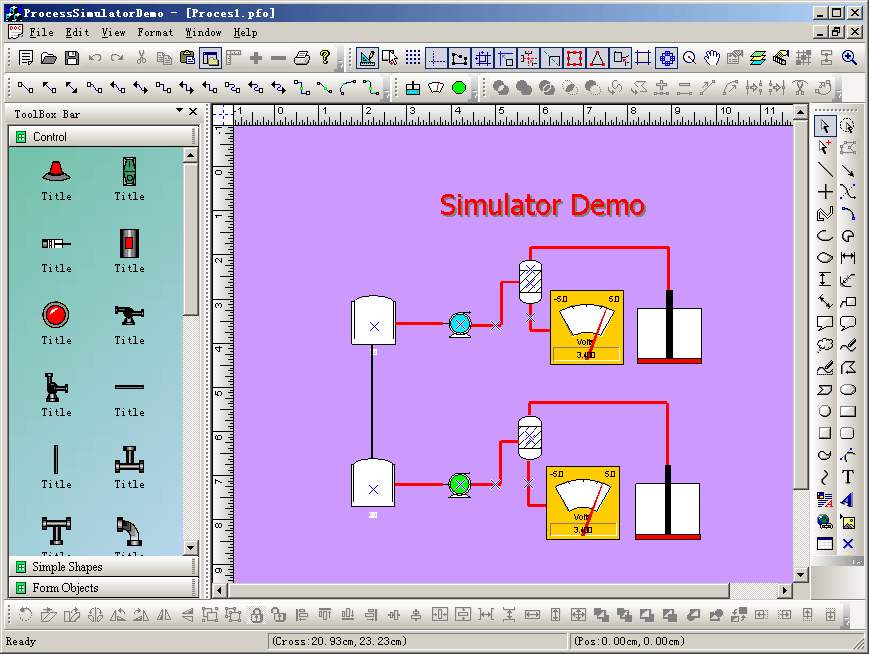
Steps: 1. Create a new class CExtEllipseShape that uses CFOEllipseShape2 as base class. 2. Create class CExtMeterShape that uses CFODrawPortsShape as base class. 3. Customize the ports of any shapes on the canvas: void CNewVisualProxy::GenerateDefaultPorts(CArray<FOP_PortScale,FOP_PortScale>* mpSpot) { mpSpot->RemoveAll(); FOP_PortScale m_Scale; m_Scale.xScale = 0.5; m_Scale.yScale = 0.5; mpSpot->SetSize(1); mpSpot->SetAt(0,m_Scale); } 4. Drawing custom shapes: void CProcessSimulatorDemoView::OnDrawMymeter() { // TODO: Add your command handler code here m_drawshape = MY_METER; SetCurrentDrawingCursor(IDC_FO_DRAWRECT_CURSOR); m_action_state = State_DrawRect; m_bUpRightMode = FALSE; } void CProcessSimulatorDemoView::OnUpdateDrawMymeter(CCmdUI* pCmdUI) { // TODO: Add your command update UI handler code here BOOL bDesign = GetCurrentModel()->IsDesignMode(); pCmdUI->Enable(bDesign); if(bDesign) { pCmdUI->SetCheck(m_drawshape == MY_METER && (!m_bUpRightMode)); } } void CProcessSimulatorDemoView::OnDrawMyellipse() { // TODO: Add your command handler code here m_drawshape = MY_ELLIPSE; SetCurrentDrawingCursor(IDC_FO_DRAWELLIPSE_CURSOR); m_action_state = State_DrawEllipse; m_bUpRightMode = FALSE; } void CProcessSimulatorDemoView::OnUpdateDrawMyellipse(CCmdUI* pCmdUI) { // TODO: Add your command update UI handler code here BOOL bDesign = GetCurrentModel()->IsDesignMode(); pCmdUI->Enable(bDesign); if(bDesign) { pCmdUI->SetCheck(m_drawshape == MY_ELLIPSE && (!m_bUpRightMode)); } }
|
Copyright ?1998-2007 UCanCode.Net Software, all rights reserved.
Other product and company names herein may be the trademarks of their respective owners.
Please direct your questions or comments to webmaster@ucancode.com