|
|
||
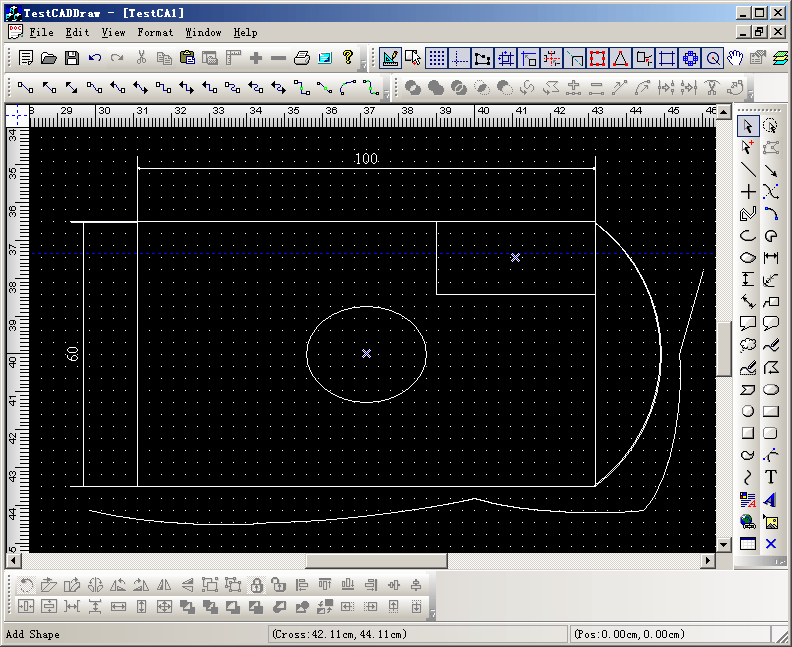
1. CAD like black background and write drawing. 2. Drawing from center. 3. Printing only the drawing. 4. Hit only the border. 5. With map mode MM_HIENGLISH. 6. ...etc.
Steps: 1. Initial the canvas: void CTestCADDrawView::DoChangeModel(CFODataModel * pModel) { CSize szCanvas = CSize(1000,1000); pModel->SetCanvasSize(szCanvas); pModel->SetBkColor(RGB(0,0,0)); pModel->SetPageBkColor(RGB(0,0,0)); pModel->SetBorderShow(FALSE); pModel->SetGridColor(RGB(255,255,255)); pModel->SetGridLineType(GRID_DOT); }
void CTestCADDrawView::OnInitialUpdate()
{
	SetCurrentModel(GetDocument()->m_pDataModel);
	CFODrawView::OnInitialUpdate();

	ChangeMapMode(MM_HIENGLISH);
	CSize szCanvas;
	szCanvas = CSize(2000,2000);
	SetCanvasSize(szCanvas);
	GetCurrentModel()->SetPrintOrientation(DMORIENT_LANDSCAPE);
	GetCurrentModel()->UpdatePrinter();
	EnableCreate1stPointAsCenter(TRUE);
	UpdateScrollBarSize();
	SetRulerUnit(FUNIT_CM);
	SetZoomScale(100,FALSE);
}
3. Change the printing setting: void CTestCADDrawView::DoDrawPrintObjects(CDC *pDC,const CRect &rcPrintPage) { CRect rcTruePrint(rcPrintPage); CRect rcCurPage = rcPrintPage; ::LPtoDP(pDC->m_hDC, (LPPOINT) ((LPRECT)rcTruePrint), 2); CRgn rgnRect; rgnRect.CreateRectRgn( rcTruePrint.TopLeft().x, rcTruePrint.TopLeft().y, rcTruePrint.BottomRight().x, rcTruePrint.BottomRight().y); pDC->SelectClipRgn(&rgnRect); // Draw back shape. // DoDrawBackGround(pDC,rcCurPage); CBrush brush(RGB(255,255,255)); pDC->FillRect(&rcCurPage,&brush); brush.DeleteObject(); // Draw shapes of the view. GetCurrentModel()->OnPrintShape(pDC,rcCurPage); // Draw tab order. if(m_bTabOrder) { GetCurrentModel()->OnDrawTabOrder(pDC,rcCurPage); } // Draw select shapes. if(m_bShowSelectHandle) { DoDrawSelectShapes(pDC,rcCurPage); } pDC->SelectClipRgn(NULL); } and BOOL CTestCADDrawView::OnPreparePrinting(CPrintInfo* pInfo) { // default preparation CFODrawShape *pObj = NULL; CFODrawShapeSet* rList = GetCurrentModel()->GetShapes(); int xy = 0; for (xy = 0; xy < rList->GetCount(); xy ++ ) { pObj = (CFODrawShape *)rList->GetObject(xy); COLORREF crLine = pObj->GetLineColor(); if(crLine == RGB(255,255,255)) { pObj->SetLineColor(RGB(0,0,0)); } COLORREF crFont = pObj->GetFontColor(); if(crFont == RGB(255,255,255)) { pObj->SetFontColor(RGB(0,0,0)); } COLORREF crText = pObj->GetFontColor(); if(crText == RGB(255,255,255)) { pObj->SetFontColor(RGB(0,0,0)); } } return CFODrawView::OnPreparePrinting(pInfo); } void CTestCADDrawView::OnBeginPrinting(CDC* pDC, CPrintInfo* pInfo) { // TODO: add extra initialization before printing // XD++ Library Add line. CFODrawView::OnBeginPrinting(pDC,pInfo); } void CTestCADDrawView::OnEndPrinting(CDC* pDC, CPrintInfo* pInfo) { // TODO: add cleanup after printing CFODrawShape *pObj = NULL; CFODrawShapeSet* rList = GetCurrentModel()->GetShapes(); int xy = 0; for (xy = 0; xy < rList->GetCount(); xy ++ ) { pObj = (CFODrawShape *)rList->GetObject(xy); COLORREF crLine = pObj->GetLineColor(); if(crLine == RGB(0,0,0)) { pObj->SetLineColor(RGB(255,255,255)); } COLORREF crFont = pObj->GetFontColor(); if(crFont == RGB(0,0,0)) { pObj->SetFontColor(RGB(255,255,255)); } COLORREF crText = pObj->GetFontColor(); if(crText == RGB(0,0,0)) { pObj->SetFontColor(RGB(255,255,255)); } } CFODrawView::OnEndPrinting(pDC,pInfo); }
|
Copyright ?1998-2007 UCanCode.Net Software, all rights reserved.
Other product and company names herein may be the trademarks of their respective owners.
Please direct your questions or comments to webmaster@ucancode.com