|
|
||
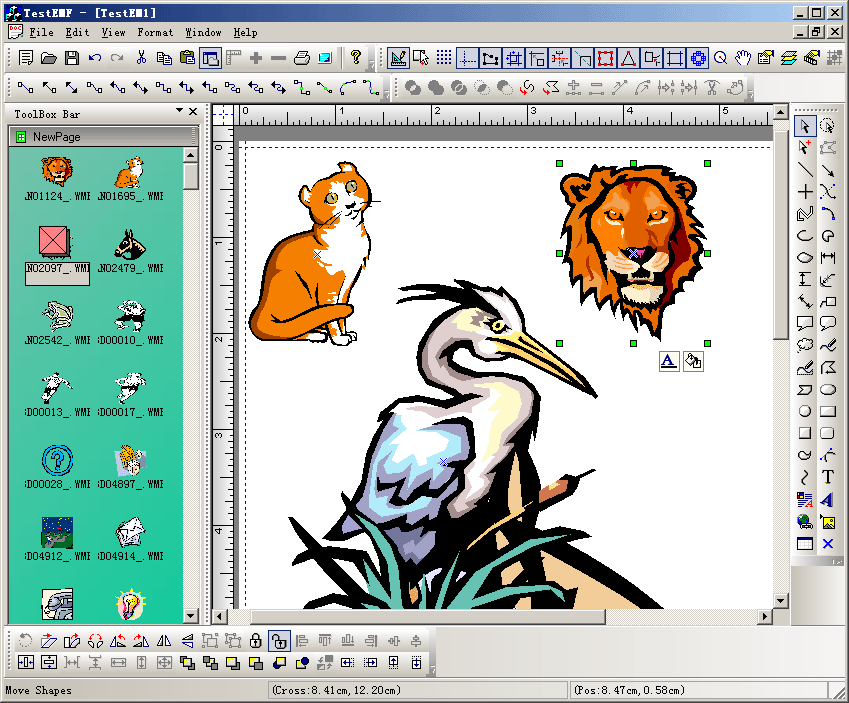
Steps: 1. Create a new class CMyImageShape that use CFOImageShape as base class. 2. Create a new class CMyListItemObj that use CFOToolBoxItem as base class, this class will draw the new style of toolbox item look. 3. Create a new class CMyToolBoxWnd that use class CFOMultiToolBoxWnd as base class. 4. Create a new dock controlbar class CMyToolBoxBar. 5. Rewrite the following method of CFODataModel: CFODrawShape *CMyExtDataModel::DoCreateShapeByType(UINT m_drawshape,CRect &rcCreate,CString strFileName, CFOToolBoxItem *pCurItem) { CFODrawShape *pReturn = NULL; CString strCaption; CString strName; strCaption = ""; strName = ""; CPoint ptTrack = rcCreate.TopLeft(); if(m_drawshape != FO_COMP_NONE) { CRect rc(rcCreate); rc.NormalizeRect(); if(rc.IsRectEmpty()||(rc.Width()<=10 && rc.Height()<20)) { if(m_drawshape == 1220) { rc = CRect(ptTrack.x-70,ptTrack.y-70,ptTrack.x+70,ptTrack.y+70); } } if(m_drawshape == 1220) { if(pCurItem->IsKindOf(RUNTIME_CLASS(CMyListItemObj))) { CMyListItemObj *pItem = (CMyListItemObj *)pCurItem; // Get icon file path. CString strFile; strFile = pItem->m_strPath; strFile += "\\"+pItem->m_strImageFileName; pReturn = new CFOWMFShape; pReturn->AddRef(); pReturn->Create(rc,_T("")); ((CFOWMFShape *)pReturn)->LoadImage(strFile); pReturn->SetObjectCaption(GetUniqueCaption(pReturn->GetType())); pReturn->SetObjectName(GetUniqueName(pReturn->GetType())); } } else { pReturn = CFODataModel::DoCreateShapeByType(m_drawshape,rcCreate,strFileName); } } return pReturn; }
6. Override the following method of CFODrawView: ///////////////////////////////////////////////////////////////////////////// // CSample3View drawing CFODrawShape *CTestEMFView::GetOleDataObject(COleDataObject* pDataObject) { CMyListItemObj *pItem = new CMyListItemObj; if(!CFOToolBoxPageWnd::CreateFromOleData (pItem,pDataObject)) { delete pItem; pItem = NULL; return NULL; } CFODrawShape *pReturn = NULL; if(pItem != NULL) { CRect rcCreate = CRect(0,0,0,0); pReturn = GetCurrentModel()->DoCreateShapeByType(pItem->GetType(),rcCreate,"",pItem); delete pItem; pItem = NULL; } return pReturn; } 7. Add Insert Ole object call: void CTestEMFView::OnInsertObjects() { // TODO: Add your command handler code here OnFOPInsertObject(); } void CTestEMFView::OnUpdateInsertObjects(CCmdUI* pCmdUI) { // TODO: Add your command update UI handler code here BOOL bDesign = GetCurrentModel()->IsDesignMode(); pCmdUI->Enable(bDesign); } |
Copyright ?1998-2007 UCanCode.Net Software, all rights reserved.
Other product and company names herein may be the trademarks of their respective owners.
Please direct your questions or comments to webmaster@ucancode.com