|
|
||
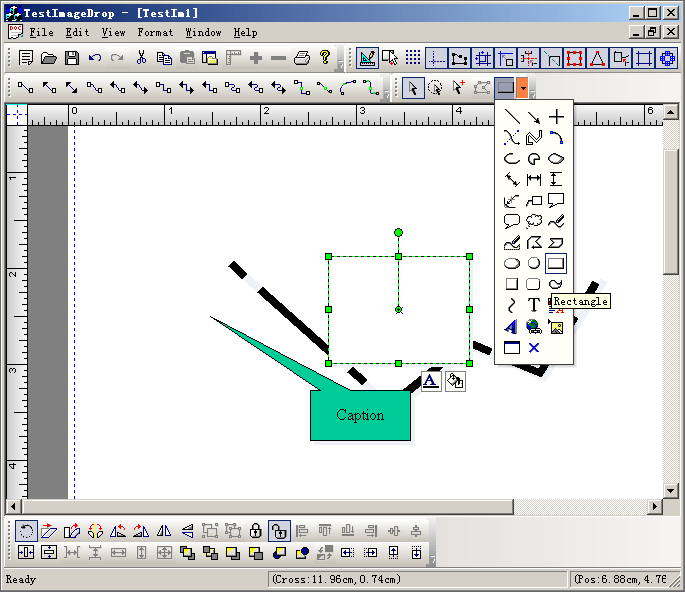
1. Create toolbar with codes:
m_wndDrawToolBar.ChangeToDropImagePickerButton(ID_NEW_TEST,ID_TESTDROPARROW, 2. Select item for drawing: void CTestImageDropView::OnNewTest() { // TODO: Add your command handler code here m_bClicked = FALSE; CMainFrame* pFrameWnd = (CMainFrame*) AfxGetMainWnd(); if(!pFrameWnd->m_wndDrawToolBar.IsVertDock()) { m_bClicked = !m_bClicked; if(m_bClicked) { DoDraw(m_nCurItemIndex); } } } void CTestImageDropView::OnUpdateNewTest(CCmdUI* pCmdUI) { // TODO: Add your command update UI handler code here BOOL bSelect = (m_drawshape == FO_COMP_NONE || FO_COMP_PORT); BOOL bDesign = GetCurrentModel()->IsDesignMode(); pCmdUI->Enable(bDesign); if(bDesign) { if(m_action_state == State_SelectNone) { m_bDrawing = FALSE; } pCmdUI->SetCheck(!bSelect || m_bDrawing); } if(!(!bSelect || m_bDrawing)) { CMainFrame* pFrameWnd = (CMainFrame*) AfxGetMainWnd(); if(!pFrameWnd->m_wndDrawToolBar.IsVertDock()) { if(m_bClicked) { if(m_action_state == State_SelectNone) { m_bClicked = FALSE; } pCmdUI->SetCheck(m_bClicked); } } } } void CTestImageDropView::OnDrawItemChange() { int nIndex; CMainFrame* pFrameWnd = (CMainFrame*) AfxGetMainWnd(); pFrameWnd->m_wndDrawToolBar.SendMessageToButtons(ID_NEW_TEST,CFOPComplexWellButton::IGetIndex, &nIndex); OnFOPFoDrawSelect(); if(m_nCurItemIndex == nIndex) { DoDraw(m_nCurItemIndex); return; } else { DoDraw(nIndex); m_nCurItemIndex = nIndex; m_bDrawing = TRUE; } } |
Copyright ?1998-2007 UCanCode.Net Software, all rights reserved.
Other product and company names herein may be the trademarks of their respective owners.
Please direct your questions or comments to webmaster@ucancode.com