|
|
||
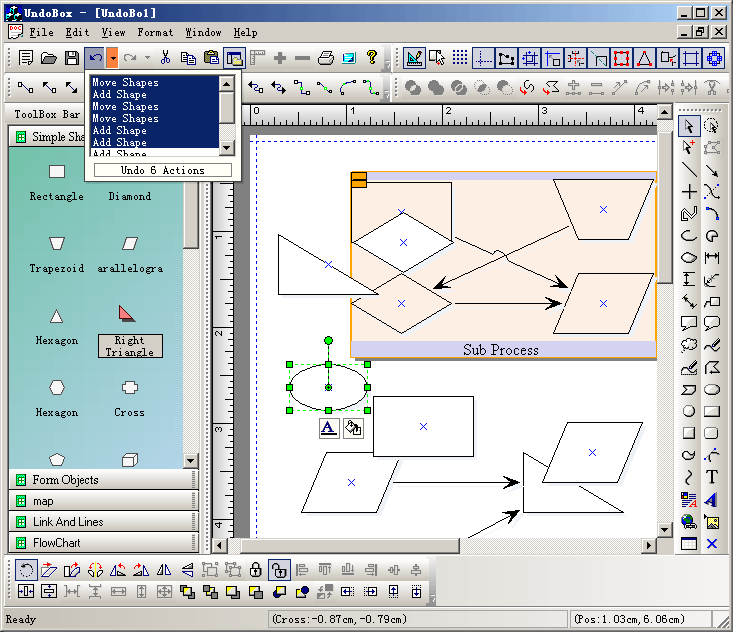
Steps: 1. Create undo list box:
m_wndToolBar.ChangeToDropUndoListPickerButton(ID_EDIT_UNDO,ID_UNDODROPARROW,&m_UndoString,BS_OWNERDRAWN|BS_DROPARROWHORZ,TRUE,FALSE); 2. Do undo / redo actions: void CUndoBoxView::OnUpdate(CView* pSender, LPARAM lHint, CObject* pHint) { // TODO: Add your specialized code here and/or call the base class CFODrawView::OnUpdate(pSender,lHint,pHint); CMainFrame *pParent = STATIC_DOWNCAST(CMainFrame,AfxGetMainWnd()); ASSERT_VALID(pParent); if(pParent->IsWindowVisible()) { pParent->m_UndoString.RemoveAll(); pParent->m_RedoString.RemoveAll(); GetCurrentModel()->GetUndoActionText(&pParent->m_UndoString); GetCurrentModel()->GetRedoActionText(&pParent->m_RedoString); } } LONG CUndoBoxView::OnUndoRedoOK(UINT wParam, LONG lParam) { int nTotalActions = (int)wParam; int nType = (int)lParam; AfxGetApp()->BeginWaitCursor(); if(nType == 5000) { GetCurrentModel()->UndoMacro(nTotalActions); } else { GetCurrentModel()->RedoMacro(nTotalActions); } AfxGetApp()->EndWaitCursor(); return 0L; } |
Copyright ?1998-2007 UCanCode.Net Software, all rights reserved.
Other product and company names herein may be the trademarks of their respective owners.
Please direct your questions or comments to webmaster@ucancode.com