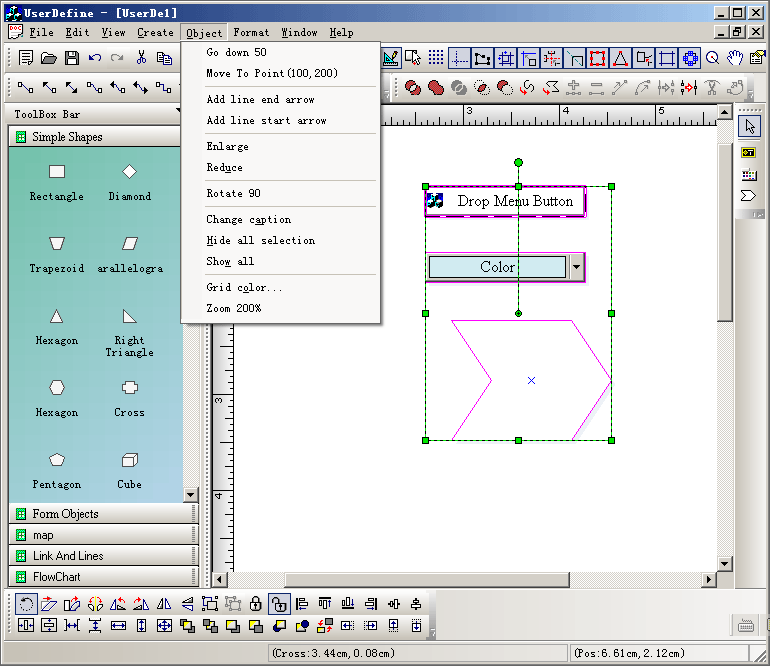
|
|
||
Steps: 1. Create line shape: void CUserDefineView::OnCreateLine() { // TODO: Add your command handler code here CArray<CPoint,CPoint> ptArray; ptArray.Add(CPoint(30,40)); ptArray.Add(CPoint(120,90)); ptArray.Add(CPoint(200,120)); CFOLineShape *pReturn = new CFOLineShape; pReturn->AddRef(); pReturn->Create(&ptArray); CString strCaption = GetCurrentModel()->GetUniqueCaption(pReturn->GetType()); CString strName = GetCurrentModel()->GetUniqueName(pReturn->GetType()); pReturn->SetObjectCaption(strCaption); pReturn->SetObjectName(strName); GetCurrentModel()->InsertShape(pReturn); pReturn->Release(); pReturn = NULL; } 2. Create rectangle: void CUserDefineView::OnCreateRect() { // TODO: Add your command handler code here CRect rcTest; rcTest = CRect(100,100,200,250); CFORectShape *pReturn = new CFORectShape; pReturn->AddRef(); pReturn->Create(rcTest,""); CString strCaption = GetCurrentModel()->GetUniqueCaption(pReturn->GetType()); CString strName = GetCurrentModel()->GetUniqueName(pReturn->GetType()); pReturn->SetObjectCaption(strCaption); pReturn->SetObjectName(strName); pReturn->RemoveAllPorts(); pReturn->CreateDefaultPort(0.5,0.5); GetCurrentModel()->InsertShape(pReturn); pReturn->Release(); pReturn = NULL; } 3. Moving shape: void CUserDefineView::OnObjectMoveY50() { // TODO: Add your command handler code here if(m_listSelectComp.GetCount() >0) { int nMove = 50; DoMoveAction(&m_listSelectComp, 0, nMove); } } void CUserDefineView::OnObjectMoveTo() { // TODO: Add your command handler code here if(m_listSelectComp.GetCount() > 0) { CRect rcPos = GetCompsMaxRect(&m_listSelectComp); CPoint ptMove; ptMove = CPoint(100 - rcPos.TopLeft().x,200 - rcPos.TopLeft().y); DoMoveAction(&m_listSelectComp, ptMove.x, ptMove.y); } }
void CUserDefineView::OnObjectRotate90()
{
	// TODO: Add your command handler code here
	int nCount = 0;
	CFODrawShapeList lstRotate;
    CFODrawShape* pShape;
	POSITION pos = m_listSelectComp.GetHeadPosition();
	while(pos != NULL)
	{
		pShape = m_listSelectComp.GetNext(pos);
		if(pShape != NULL && !pShape->IsLock())
		{
			if(pShape->IsPolyObject() &&
				(!pShape->IsKindOf(RUNTIME_CLASS(CFOLinkShape))) &&
				(!pShape->IsKindOf(RUNTIME_CLASS(CFOStaticShape))))
			{
				lstRotate.AddTail(pShape);
				nCount ++;
			}
		}
	}

	if(nCount > 0)
	{
		DoRotateShapesAction(&lstRotate,900);
	}
}
|
Copyright ?1998-2007 UCanCode.Net Software, all rights reserved.
Other product and company names herein may be the trademarks of their respective owners.
Please direct your questions or comments to webmaster@ucancode.com