Visual C++ drawing tutorial, drawline and drawarc
|
|
New Building your own SCADA Software -- Full VC++ Source Codes |
| Add Diagrams and SCADA to your applications. E-XD++ Diagrammer brings accurate and intuitive diagrams and dashboards to your c++ desktop applications. It offers a comprehensive set of tools, components and graphic objects for creating visualization, editing and monitoring Windows applications, more... | |
|
|
New HMI and Graphics Software ToolKit Solution -- Full VC++ Source Codes |
| UCanCode E-XD++ Visualization ToolKit is an extremely flexible and robust graphical framework for building visual interfaces that display real-time data, from Process Control operator displays and HMI screens to Traffic and Telemetry Monitoring displays and Supply Chain visualizations. more... | |
|
|
New Real-time data display and HMI Software Component Solution -- Full VC++ Source Codes |
| UCanCode is a lading provider of Dynamic Graphics, Data Visualization, Human-Machine Interface (HMI) and Real-Time Mapping Solutions for software developers around the world. Its products are used to visualize and control real-time and mission-critical processes in a variety of industries, more... | |
|
|
UCanCode Electronic form solution from ucancode -- Full VC++ Source Codes |
| UCanCode software is the only software company to ship high quality E-Form Component Source Code in the world. You will have a E-Form Designer component and a E-Form Reader component (All with 100% VC++ / .NET Source Codes), you also have the license to modify any party of these source codes to build your own E-Form Applications, it will save tons of month (or Over 90%) development time to build any E-Form based application, more... |
|
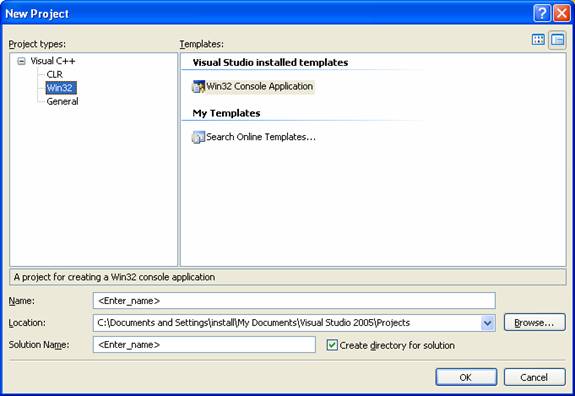
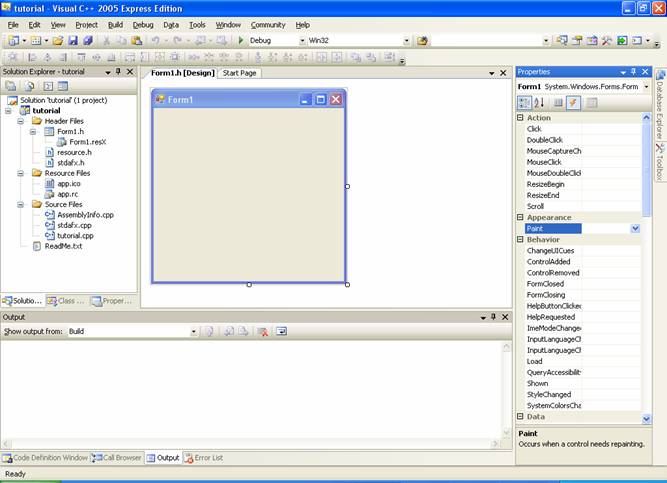
There are a number of tutorials for using Visual C++ 2005 on the Microsoft web page. Unfortunately, there do not appear to be any complete tutorials that walk you through a drawing task step by step from beginning to end. The following tutorial does that.
private: System::Void On_paint(System::Object^ sender, System::Windows::Forms::PaintEventArgs^ e) { }
the variable “e” is a handle to the Graphics object associated with the form. The Graphics class enables you do draw on Forms.
private: System::Void On_paint(System::Object^ sender, System::Windows::Forms::PaintEventArgs^ pe) { Graphics^ g = pe->Graphics; g->Clear(Color::AntiqueWhite);
Rectangle rect = Form::ClientRectangle; Rectangle smallRect; smallRect.X = rect.X + rect.Width / 4; smallRect.Y = rect.Y + rect.Height / 4; smallRect.Width = rect.Width / 2; smallRect.Height = rect.Height / 2;
Pen^ redPen = gcnew Pen(Color::Red); redPen->Width = 4; g->DrawLine(redPen, 0, 0, rect.Width, rect.Height);
Pen^ bluePen = gcnew Pen(Color::Blue); bluePen->Width = 10; g->DrawArc( bluePen, smallRect, 90, 270 ); } . |